Free · India
You Paid for a Train Ticket. Is Your Seat Confirmed?
A short, illustrated-in-text guide to reading an Indian Railways reservation before you travel.
You paid for a train ticket from Delhi to Agra. Your bank shows the payment. You have a message that looks like a booking. But the railway screen says WL. Can you board? Do you have a berth? Is the money gone if the seat never becomes available?
The short answer: Payment, a booked reservation and a confirmed place to travel are three different things. A reservation may be CNF (confirmed), RAC (reservation against cancellation) or WL (waitlisted), and the status can change before the reservation chart is prepared. Check the current status of each passenger using the official railway PNR enquiry, especially near departure. A fully waitlisted e-ticket does not authorize boarding after chart preparation: IRCTC says those names are dropped from the chart and the e-ticket is automatically cancelled under the applicable refund process. [1–3]
This article does not book tickets or interpret your actual PNR. It explains how to check your own reservation accurately. Any names, numbers, dates and sample results below are fictional and are not valid tickets.
1. Three different things people call “my confirmed ticket”
First: the payment. Your card, wallet or bank may show a debit. That alone is not proof that a railway booking succeeded. If checkout behaved strangely, check the booked-ticket history in the account or authorized booking service, and use the operator's support route instead of assuming a debit produced a reservation. IRCTC's registration terms specifically tell users to check their booked tickets and avoid an unnecessary repeat transaction. [4]
Second: the booking record. A successfully issued reserved ticket gives you a PNR (Passenger Name Record), the reference used for reservation enquiry. A PNR can exist even when a passenger is waitlisted. Having a PNR does not mean that the person has been allotted a confirmed seat or berth. [1]
Third: the passenger's status now. The official PNR page distinguishes Booking Status (what was recorded when the reservation was made) from Current Status (what applies at the enquiry time). If the final charts have not been prepared, the latter can change. The page also shows Charting Status. You need all three pieces of information to understand where things stand. [1]
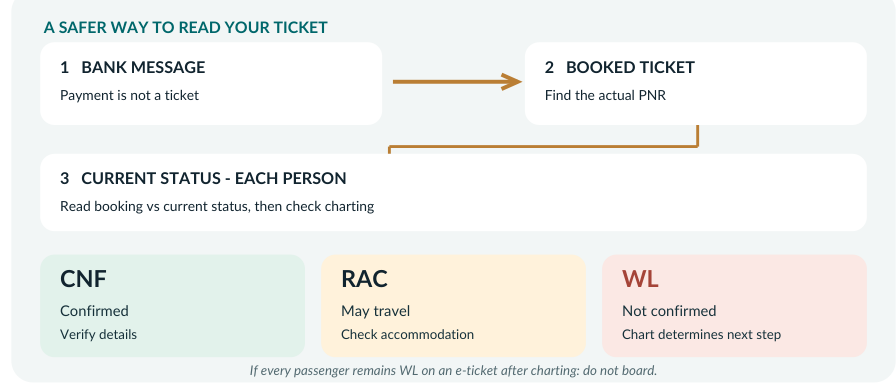
A mental picture
BANK / PAYMENT MESSAGE
          |
          v
BOOKED TICKET + PNR?  -- no / unclear --> Check booking history or operator support.
          |
         yes
          v
CHECK CURRENT STATUS FOR EACH PASSENGER
     |               |                  |
    CNF             RAC                 WL
     |               |                  |
Confirmed       Can travel under     Not a confirmed place.
reservation     RAC conditions       Recheck after charting.
     |               |                  |
     +---------------+------------------+
                     |
           CHECK CHARTING STATUS
                     |
          Recheck official PNR near departure.
          All passengers still WL on an e-ticket
          after charting? Do NOT board.
The drawing is a memory aid, not a real ticket, official chart or forecast of your seat.
2. Read the official PNR result in the right order
You do not need to guess the meaning of a code from a forwarded message. Use the Indian Railways Passenger Reservation Enquiry page:
Official PNR enquiry: https://www.indianrail.gov.in/enquiry/PNR/PnrEnquiry.jsp
The page asks for the PNR shown on your ticket and displays train details, passenger booking/current status and charting information. Its design may change, so use the field names, not a memorized position on the screen. [1]
Check A — Is this the journey you meant? Compare the train number and name, travel/boarding date, stations, boarding point and class to your ticket. A station you travel from is not automatically your authorized boarding point (the specific boarding station shown for your booking). Do not infer that two similarly named stations are interchangeable.
Check B — Is the booking attached to each traveller? If you booked for more than one person, read the row for each passenger, not only the first person's status. A group booking can contain a mixture of confirmed, RAC and waitlisted people. [1–2]
Check C — What was the booking status, and what is current? A row might show WL 12 when booked but CNF later. A confirmed status may not display a coach/berth number until charting. Do not mistake the original booking label for today's result or the absence of an early berth number for a failed payment. [1]
Check D — Has the chart been prepared? Before charting, status can still change. After charting, it is especially important to read the resulting actual passenger status and follow the applicable boarding rules. A prediction or probability displayed by an information service is not an allotted place. The official enquiry explicitly warns that predictions are indicative only. [1]
Check E — Save a useful record. Keep your actual booking reference and ticket in a secure place accessible offline; keep original acceptable travel identity documentation. IRCTC's official FAQ includes a passport among accepted original photo IDs for e-ticket travel. Do not share your PNR, passenger names, identity images or payment details in a public post or with someone who contacts you unexpectedly. [5]
3. What the most important letters mean
| Code shown | Meaning in the official railway legend | Practical interpretation |
|---|---|---|
| CNF | Confirmed | A confirmed reservation. Check the coach and seat/berth details as they become available and verify the correct journey. |
| RAC | Reservation Against Cancellation | Not the same as a confirmed full berth. Railways' passenger information permits travel with RAC; sitting accommodation may be provided initially and a berth allotted if available. Check your current details. |
| WL | Waiting List | You are not confirmed. Recheck your current status and charting; a fully waitlisted e-ticket after chart preparation cannot be used to board. |
| GNWL, RLWL, PQWL, TQWL | Different waiting-list/quota types | Different labels are not confirmation. You do not need to memorize every quota to make the immediate safety decision: read the current passenger status. |
| CAN / MOD | Cancelled or modified passenger | Investigate the actual changed or cancelled status rather than using an old copy of the ticket. |
Official legend: Indian Railways PNR Enquiry [1]. RAC travel explanation: Indian Railways reservation guidance; the key distinction is also reflected in IRCTC's charting rules [2].
What not to do: Treat an app's “confirmation chance,” a payment text, or a waitlist position that looks numerically promising as permission to board. Numbers may move, and a prediction is not a promise.
4. Three fictional travellers, three different answers
Case 1 — Meera: WL when purchased, CNF today
Meera buys an e-ticket. At purchase, the booking row says WL 8. Later, the official PNR enquiry displays CNF under Current Status. She sees that the result refers to the correct date and train. She still checks Charting Status and the final travel details before leaving. There was a booking earlier, but the useful fact now is the current confirmed status.
Lesson: Booking Status records history; Current Status is what you must review now.
Case 2 — Daniel and Ruth: two waitlisted passengers on one e-ticket
Daniel and Ruth are visiting India together. Their reservation has one PNR with two passenger rows. After chart preparation, both rows remain WL, with no passenger confirmed or RAC.
For a fully waitlisted e-ticket, IRCTC says the passengers' names are dropped from the chart. They may not board on that e-ticket. IRCTC arranges cancellation and an electronic refund to the account used for the booking under its waitlisted-e-ticket terms after charting; the traveller should still check the actual transaction/refund status rather than assume a particular fee or credit date. This automatic process for a fully waitlisted e-ticket is different from a TDR claim for certain other cases. They need a new valid travel arrangement if they still want to make the journey. [2]
Lesson: An e-ticket reference and a debit do not override the chart result.
Case 3 — Fatima's family: a mixed PNR
Fatima booked for several family members. At chart time the result contains CNF, RAC and WL in different rows. This is not the same as a fully waitlisted e-ticket. IRCTC's official guidance describes mixed passenger statuses separately, including chart treatment and special cancellation/refund rules. The family must not infer that every person has a confirmed berth—or automatically treat the entire PNR as cancelled. [2–3]
They read every row, check the chart and ask IRCTC or authorized railway staff about the waitlisted member's valid travel position before boarding. If they cannot travel together, they use the official booking/cancellation/TDR guidance to decide what to do. They do not rely on a tour operator's informal assurance. [2–3]
Lesson: A family ticket is one booking reference, but the status of each named traveller matters.
5. What to do if the result is not what you expected
“My bank took the money, but I do not see a booking.” Check the official booked-ticket history and any legitimate confirmation from the booking channel. Keep a private record of the transaction time/reference without sharing card details. If no booking is recorded or the result is unclear, use the operator's official eQuery/customer support. Avoid starting multiple payments solely because the checkout screen froze. [4, 6]
“The page says RAC, but no full berth appears.” RAC is not equivalent to CNF. Check the current coach/accommodation information, charting result and the actual conditions of travel; do not advertise it to a companion as two independently confirmed berths. [1–2]
“The screen still says WL as departure approaches.” Check whether charts are prepared. If all passengers on the e-ticket remain waitlisted after charting, do not board on that ticket. If only some remain waitlisted, do not guess the permissions for the group; consult the official rules and railway staff. [2]
“Someone says the seat will surely become confirmed.” The official PNR enquiry states that prediction is indicative and can differ from actual status. A probability is not a ticket entitlement. Plan an alternative that can actually be booked if your journey is important. [1]
“I need to cancel, or I did not travel.” The process depends on passenger status, timing and whether the chart has been prepared. IRCTC's e-ticket cancellation instructions describe online cancellation before charting and a Ticket Deposit Receipt (TDR) route for specified post-charting claims. Do not assume a railway station counter can cancel an IRCTC e-ticket or that all refunds are automatic. For mixed family bookings, consult the specific rules rather than cancelling one row casually. Follow the current official instructions and deadlines for your case; this article does not provide fee or eligibility advice. [3]
“I opted for an alternative train.” The IRCTC VIKALP scheme is separate from ordinary confirmation. Opting into it does not guarantee alternate accommodation; the terms require checking PNR after charting and warn that an alternate allocation may involve different nearby boarding or destination stations. Verify the actual train and station before leaving. [7]
6. One-minute check before leaving your accommodation
Put these six lines on your own phone note—not in a public comment:
- Correct ticket? Same train number/name, journey date, class, boarding station and destination.
- Actual booking? Issued ticket/PNR visible from an authorized booking channel, not just a bank debit.
- Each traveller? Read every row's Current Status, not only the first person's Booking Status.
- Chart ready? Check Charting Status and recheck near departure. Treat predictions as estimates only.
- Allowed to travel? CNF/RAC have different accommodation; a fully WL e-ticket after charting is not boardable. Mixed statuses require individual attention.
- Prepared? Keep ticket/reference and original accepted identity documentation, with station/boarding details stored securely. If anything conflicts, use official enquiry and support before committing to the journey.
The distinction to remember
Payment proves a money event. A PNR proves a reservation record. The latest passenger status and chart tell you what that reservation actually allows. Take an extra minute to check the last one.
Official sources, scope, and editorial verification (not for the article's opening reading flow)
Research and direct public-page verification: 21 October 2026; official PNR, cancellation, waitlisted e-ticket and VIKALP guidance rechecked 23 October 2026. No actual passenger PNR, fare payment, account registration, reserved booking, train ride, chargeback, or refund has been tested. The sample passengers and results are entirely invented; do not render them as convincing official ticket images.
- Indian Railways — Passenger Reservation Enquiry (PNR). Distinguishes Booking Status, Current Status and Charting Status; provides CNF/RAC/WL and other legends; warns pre-chart status may change and predictions are indicative. https://www.indianrail.gov.in/enquiry/PNR/PnrEnquiry.jsp (retrieved/indexed within days of 2026-10-21; live public result template, not a PNR lookup).
- IRCTC — Scheme for Issue of Waitlisted E-tickets. Fully waitlisted e-tickets after charting: names dropped, not authorized to board; separate rules for partly confirmed/RAC/waitlisted group bookings. https://contents.irctc.co.in/en/Waitlisted_E-Ticket.html (retrieved 2026-10-21).
- IRCTC — E-Ticket Cancel. Before/after charting distinctions; TDR; mixed ticket and return claims; do not reuse unverified fee tables. https://contents.irctc.co.in/en/eticketCancel.html (retrieved 2026-10-21).
- IRCTC — User Registration Terms and Conditions. Advises checking booked tickets and not performing repeat payment when transaction uncertain. https://contents.irctc.co.in/en/userRegTermsAndConditions.html (retrieved 2026-10-21).
- IRCTC — E-ticketing FAQ. Passport among original photo identity documents; booking and cancellation path. https://contents.irctc.co.in/en/etktfaq.html (retrieved 2026-10-21).
- IRCTC — Contact Us / eQuery. Current official enquiry options rather than hard-coded historic call-center data. https://contents.irctc.co.in/en/ContactUsEn.html (retrieved 2026-10-21).
- IRCTC — VIKALP Terms and Conditions. Alternate train selection is not guaranteed; chart status and possible nearby stations matter. https://contents.irctc.co.in/en/vikalpTerms.html (retrieved 2026-10-21).